






IFC India China Sourcing Tool with Import Duty, Landed Cost Calculator is a free connector by IFC – Imports From China that lets AI assistants such as Claude and ChatGPT find wholesale products on 1688.com and work out what they will cost delivered in India. In one conversation you can search China’s largest wholesale marketplace, compare suppliers, look up the Indian HS code and import duty, and get the door-to-door landed cost in INR.
This documentation explains how to add the IFC India China Sourcing Tool with Import Duty, Landed Cost Calculator to Claude, ChatGPT and other AI apps, what each of its 11 tools does, and which prompts get the best results.
Quick facts
Everything you need to connect the IFC India China Sourcing Tool with Import Duty, Landed Cost Calculator:
- Connector URL:
https://mcp1.importsfromchina.com/mcp - Protocol: Model Context Protocol (MCP), Streamable HTTP transport
- Sign-in: none. All 11 tools are read-only.
- Price: free to use. You pay IFC only if you place an import order.
- Works with: Claude (web, desktop, mobile and Claude Code), ChatGPT, Cursor, VS Code, Windsurf, Gemini CLI and any other MCP client
- Data sources: 1688.com product data, Indian customs duty data and IFC’s freight rate card
Contents
- What the tool does
- Add it to Claude
- Add it to ChatGPT
- Add it to Cursor, VS Code, Gemini CLI and other AI apps
- The 11 tools explained
- Example prompts
- Product cards and “Get a quote”
- Limits and good to know
- Privacy and security
- FAQ
- Support
What is the IFC India China Sourcing Tool with Import Duty, Landed Cost Calculator?
Importing from China usually means switching between a marketplace in Chinese, a currency converter, the customs tariff and a freight quote. The IFC India China Sourcing Tool with Import Duty, Landed Cost Calculator brings all of these into your AI assistant, so you can ask in plain English (or Hindi) and get an answer you can act on.
It does three jobs, and your assistant picks the right one from what you ask:
- Product sourcing: search 1688.com by keyword or by photo, filter suppliers, and compare prices, minimum order quantities (MOQ), variants, specifications and buyer reviews.
- Import duty: find the 8-digit Indian HS code for a product and look up Basic Customs Duty (BCD), Social Welfare Surcharge (SWS) and IGST.
- Landed cost: calculate the full doorstep cost in INR by sea or air, using the same engine as the IFC shipment calculator.
You don’t need to tell the IFC India China Sourcing Tool with Import Duty, Landed Cost Calculator which job to do. Ask only for products and you get products. Ask only for a cost with your own invoice value, weight and volume, and the tool calculates without searching 1688. Ask for both, and it finds the product first, then works out what it costs in India.
Key features
What the IFC India China Sourcing Tool with Import Duty, Landed Cost Calculator gives you:
- Keyword search in any language, and photo search that finds the same or similar products
- Filters for price, MOQ, supplier type, province, years on 1688, supplier rating, super factory, free shipping in China, new arrivals and dropshipping
- IFC trust score (0–100) for every supplier, based on years on 1688, buyer ratings, factory and verification badges, followers and repeat-buyer rate
- Real buyer reviews, with 1688’s automatic “default positive” reviews removed
- Interactive product cards in Claude and other apps that support MCP Apps
- One-tap “Get a quote” that opens WhatsApp to IFC with the product, variant, quantity and warehouse filled in
How to add the IFC India China Sourcing Tool with Import Duty, Landed Cost Calculator to Claude
There are two ways to add the IFC India China Sourcing Tool with Import Duty, Landed Cost Calculator to Claude. Both give you the same 11 tools and the same product cards.
Option 1: From the Claude connectors directory (Community connector)
The IFC India China Sourcing Tool with Import Duty, Landed Cost Calculator is submitted to Claude’s connectors directory as a Community connector. If you can’t find it there yet, use Option 2, which works straight away. Community connectors are submitted by their developers and pass Anthropic’s automated review; “Community” describes how the listing was reviewed and does not limit what the connector can do or where else it can be used.
- In Claude, open Settings → Connectors (or the connectors directory).
- Search for IFC India China Sourcing Tool.
- Click Connect. No account or sign-in is needed.
- Start a new chat and ask, for example: Find 9W LED bulbs from Guangdong factories on 1688.
Option 2: As a custom connector
You can also add it yourself using the connector URL, which is useful if the directory isn’t available on your account or you manage connectors for a team.
- Open Settings → Connectors and click Add custom connector.
- Name:
IFC India China Sourcing Tool - URL:
https://mcp1.importsfromchina.com/mcp - Click Add, then start a new chat.
On Team and Enterprise plans, an owner may need to add the connector for the organization first.
Claude desktop and mobile apps
Once added on claude.ai, the IFC India China Sourcing Tool with Import Duty, Landed Cost Calculator is available in the Claude desktop and mobile apps when you sign in with the same account. In a chat, you can turn the connector on or off from the tools menu.
Claude Code
To use the IFC India China Sourcing Tool with Import Duty, Landed Cost Calculator in Claude Code, run:
claude mcp add --transport http ifc-sourcing https://mcp1.importsfromchina.com/mcpHow to use the IFC India China Sourcing Tool with Import Duty, Landed Cost Calculator in ChatGPT
ChatGPT supports MCP servers as apps. You can add the IFC India China Sourcing Tool with Import Duty, Landed Cost Calculator with its URL in developer mode:
- In ChatGPT, open Settings → Apps (called Apps & Connectors in some versions) and go to Advanced settings.
- Turn on Developer mode. Availability depends on your ChatGPT plan, and workspace admins may need to allow it.
- Click Create (or Add app), enter the name
IFC India China Sourcing Tooland the URLhttps://mcp1.importsfromchina.com/mcp, and choose No authentication. - In a new chat, choose the app from the tools menu and ask your question.
If IFC’s app appears in ChatGPT’s app directory, you can add it from there instead, without developer mode. See OpenAI’s help center for the latest steps.
Add it to Cursor, VS Code, Gemini CLI and other AI apps
The IFC India China Sourcing Tool with Import Duty, Landed Cost Calculator follows the open Model Context Protocol standard, so any app that supports remote MCP servers can use it. Add the URL as a remote (HTTP) server; no API key is needed.
Cursor
To add the IFC India China Sourcing Tool with Import Duty, Landed Cost Calculator to Cursor, put this in ~/.cursor/mcp.json (all projects) or .cursor/mcp.json (one project):
{
  "mcpServers": {
    "ifc-sourcing": { "url": "https://mcp1.importsfromchina.com/mcp" }
  }
}
VS Code (GitHub Copilot)
To use the IFC India China Sourcing Tool with Import Duty, Landed Cost Calculator with GitHub Copilot, add this to .vscode/mcp.json in your project, or run MCP: Add Server from the command palette:
{
  "servers": {
    "ifc-sourcing": { "type": "http", "url": "https://mcp1.importsfromchina.com/mcp" }
  }
}
Windsurf
To add the IFC India China Sourcing Tool with Import Duty, Landed Cost Calculator to Windsurf, put this in ~/.codeium/windsurf/mcp_config.json:
{
  "mcpServers": {
    "ifc-sourcing": { "serverUrl": "https://mcp1.importsfromchina.com/mcp" }
  }
}
Gemini CLI
To use the IFC India China Sourcing Tool with Import Duty, Landed Cost Calculator in Gemini CLI, add this to ~/.gemini/settings.json:
{
  "mcpServers": {
    "ifc-sourcing": { "httpUrl": "https://mcp1.importsfromchina.com/mcp" }
  }
}
Any other MCP client
Choose “remote server”, “HTTP” or “Streamable HTTP”, paste https://mcp1.importsfromchina.com/mcp and leave authentication empty. This works in AI platforms, agent builders and automation tools that support MCP. Developers can test the server with the MCP Inspector.
Where product cards appear
| App | Tools | Product cards |
|---|---|---|
| Claude (web, desktop, mobile) | All 11 | Yes, inside the chat |
| ChatGPT | All 11 | Shown where ChatGPT supports MCP Apps; otherwise a link to view the cards |
| Claude Code, Cursor, VS Code, Windsurf, Gemini CLI | All 11 | A link that opens the cards in your browser |
The 11 tools explained
The IFC India China Sourcing Tool with Import Duty, Landed Cost Calculator has 11 tools in three groups. You don’t call these tools yourself: your AI assistant chooses them from your question. Knowing what each one does helps you ask for exactly what you need.
Product sourcing tools (1688.com)
Four tools in the IFC India China Sourcing Tool with Import Duty, Landed Cost Calculator search and check products on 1688.com. Results never include supplier names or contact details.
1. search_products: search 1688 by keyword
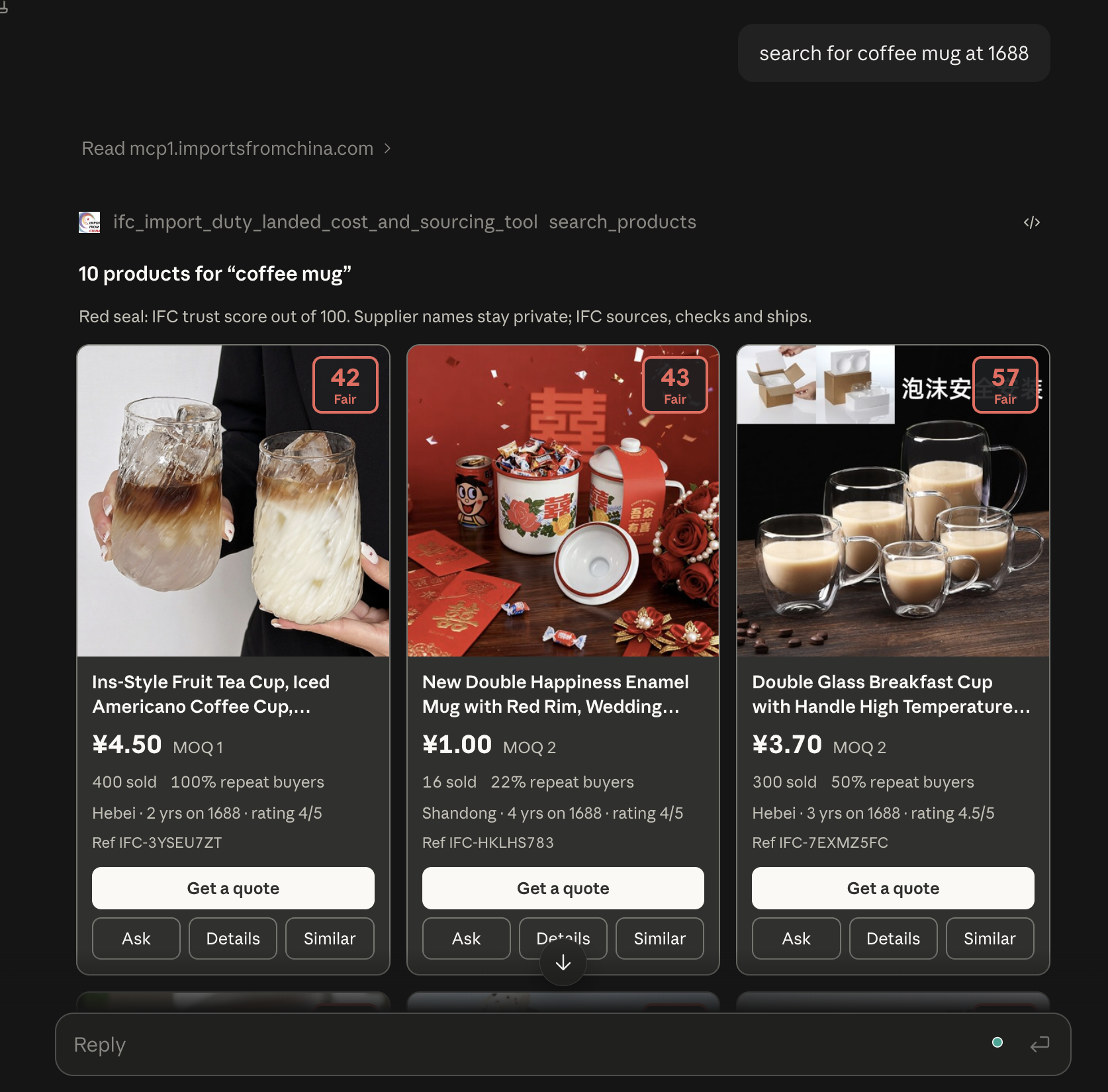
Searches 1688.com for a product name in English, Hindi, Chinese or any other language. Each result shows the English title, photo, price in Chinese yuan (CNY) with quantity tiers, MOQ, sales, a one-line supplier summary (for example “Factory · Guangdong · 6 yrs on 1688 · rating 4.8/5”) and the IFC trust score. Each product gets an IFC reference such as IFC-AB12CD34.
Filters: price range in CNY, maximum MOQ, minimum years on 1688, provinces the supplier ships from (for example Guangdong or Zhejiang), minimum supplier rating, super factory, free shipping in China, new arrivals, dropshipping support, hiding sponsored listings, and sorting by best match, sales or price.
2. search_by_image: find products from a photo
Finds the same or similar products on 1688 from a photo you attach, an image link, or an existing IFC reference (“find this from other suppliers”). It is ideal when you have a sample, a screenshot from Amazon or Instagram, or a product with no clear name. It accepts the same filters as keyword search, plus factory-only and verified-suppliers-only.
3. get_product_details: full product and supplier profile
Shows everything about one product: all photos, price tiers, MOQ and mixed-variant rules, stock, English specifications, and each variant (colour, size, capacity) with its price and package weight and size. It also shows the supplier profile: years on 1688, followers, TrustPass, super factory and manufacturer badges, the six 1688 buyer ratings (service, pre-sale support, delivery speed, dispute handling, product quality, returns) and the IFC trust score.
4. get_product_reviews: real buyer reviews
Returns the average star rating and rating breakdown from real buyers, with 1688’s automatic “default positive” reviews removed, plus recent written reviews. Reviews are in Chinese; your assistant can translate and summarise them.
Import duty and HS code tools
Four tools in the IFC India China Sourcing Tool with Import Duty, Landed Cost Calculator handle Indian HS codes and import duty, based on Indian customs data.
5. search_hsn: find the HS code
Finds 8-digit Indian HS (HSN) codes from a product description such as “bluetooth speaker” or “stainless steel water bottle”, or from the first digits of a code. Simple, generic words work best because the tariff uses official wording.
6. lookup_hsn: explain an HS code
Explains a code’s chapter, heading, sub-heading and tariff item, lists the 8-digit codes under a shorter code, and says whether duty data is available.
7. validate_hsn: check an HS code
Checks that a code is valid (digits only, 4 to 8 digits, present in the official HSN list), using the same rules as the calculator on importsfromchina.com.
8. get_duty_rates: import duty for an HS code
Returns Basic Customs Duty, Social Welfare Surcharge and IGST for an 8-digit code, plus notes on anything that needs extra attention, such as anti-dumping duty, per-unit duty, minimum import prices, cesses and import policy restrictions.
Landed cost and freight tools
Three tools in the IFC India China Sourcing Tool with Import Duty, Landed Cost Calculator turn a product and a shipment into a cost in INR.
9. calculate_landed_cost: doorstep cost in INR
Calculates the full cost of importing a shipment into India by sea (about 40–45 days) or air (about 8–12 days). You give the invoice value (USD, CNY, EUR, GBP or JPY), total weight, and volume in CBM or carton sizes, plus the HS code. The result is IFC’s cost sheet: supplier payment, freight with customs clearance and door delivery, insurance, CIF value, BCD, SWS, IGST and the total, split into supplier payment, cost till your doorstep and the GST bill.
10. get_exchange_rate: live rate to INR
Gives the current market exchange rate to Indian rupees for USD, CNY, EUR, GBP or JPY, the same rate the landed-cost calculation uses.
11. get_rate_card: IFC freight rates
Shows IFC’s freight rate card: sea rates per CBM by volume slab, the density surcharge, the air rate per kg, transit times and default settings.
Example prompts for the IFC India China Sourcing Tool with Import Duty, Landed Cost Calculator
Here are prompts that work well with the IFC India China Sourcing Tool with Import Duty, Landed Cost Calculator, grouped by task. Write prompts the way you would brief a sourcing agent. The more you say about quantity, budget, supplier type and shipping, the better the answer.
Find products by keyword
- Find 9W LED bulbs on 1688.
- Show me the best-selling wireless earbuds on 1688.
- Find stainless steel water bottles, 500 ml, under ¥15 each.
- Search 1688 for women’s cotton kurtis and sort by price, lowest first.
- What are the cheapest phone cases for iPhone 16 on 1688?
Find reliable suppliers with filters
- Find LED panel lights from Guangdong factories with at least 5 years on 1688 and a rating above 4.5.
- Show only super factories selling silicone kitchen tools, with MOQ below 200 pieces.
- Find yoga mats from manufacturers in Zhejiang, excluding sponsored listings.
- Which suppliers of USB-C cables support dropshipping and free shipping in China?
- Find new arrivals in LED strip lights from suppliers with an IFC trust score above 80.
Search by photo
- Find this product on 1688 (with a photo attached).
- Find similar lamps from factories only (with a photo attached).
- Find this same bottle from other suppliers, cheaper: IFC-AB12CD34.
- Here’s a screenshot from Amazon. What does it cost on 1688?
Check a product and its supplier
- Show me the details of the second product.
- What colours and sizes does IFC-AB12CD34 come in, and what does each weigh?
- Is this supplier reliable? Explain its ratings.
- What are buyers saying about this product? Summarise the reviews in English.
- Compare the top three results on price, MOQ and supplier rating.
Find a product and calculate the landed cost
- Find 400 ml glass coffee mugs on 1688 and tell me the landed cost of 1,000 pieces in Delhi by sea.
- How much would it cost to import this product to India? (after tapping Ask on a card)
- Pick the best three LED bulbs under ¥5 and compare their landed cost for 5,000 pieces by sea.
- Is it cheaper to ship 300 pieces of this by air or by sea?
Calculate landed cost only (your own numbers)
- Landed cost of USD 5,000 of LED bulbs, 2 CBM, 400 kg, by sea.
- I’m importing CNY 80,000 of office chairs, 120 cartons of 70 × 65 × 60 cm, 1,800 kg total. What’s the total cost by sea?
- Calculate the doorstep cost of EUR 3,000 of spare parts, 0.8 CBM, 150 kg, HS code 84833000, by air.
- What will 50 kg of samples worth USD 600 cost me by air?
HS codes and import duty
- What is the HS code for a Bluetooth speaker?
- What is the import duty on solar panels from China?
- Is there anti-dumping duty on aluminium foil from China?
- Explain HS code 85395000 and its duty rates.
- Is 9405 a valid HS code? Show me the 8-digit codes under it.
Freight, exchange rates and planning
- What is today’s USD to INR rate?
- Show IFC’s sea and air freight rates.
- How long does sea shipping from China to India take?
- My budget is ₹5 lakh landed. How many pieces of this product can I import?
Prompts in Hindi or Hinglish
- 1688 par 500 ml steel bottle dhoondo, MOQ 300 se kam.
- Is product ko Delhi tak sea se mangwane mein kitna kharcha aayega? 1,000 pieces.
- Bluetooth speaker ka HSN code aur import duty batao.
Get a quote
- I want to order 2,000 pieces of this. How do I get a quote?
- Get me a quote for the black variant, 500 pieces, by air.
How product cards and “Get a quote” work
In Claude and other apps that support MCP Apps, search results from the IFC India China Sourcing Tool with Import Duty, Landed Cost Calculator appear as product cards. Each card has four actions:
- Get a quote: choose the variant, quantity and IFC China warehouse (sea from Guangzhou or Yiwu, or air from Foshan). WhatsApp opens with your enquiry to IFC filled in; you review it and press send.
- Ask: ask a question about that product, such as “How much would it cost to import this to India?”
- Details: open the full product and supplier profile.
- Similar: find the same or similar products from other suppliers.
Supplier names and contact details are kept by IFC, not shown in the IFC India China Sourcing Tool with Import Duty, Landed Cost Calculator. When you send a quote request, IFC checks the supplier, negotiates, arranges samples, payment, consolidation, shipping and customs clearance, and confirms the final price.
Limits and good to know
Keep these points in mind when you use the IFC India China Sourcing Tool with Import Duty, Landed Cost Calculator for buying decisions.
- Prices: suppliers’ list prices in CNY. The final price depends on quantity, variant and the supplier’s confirmation.
- Weights and sizes: many 1688 listings don’t give package weight or size. For an exact landed cost, IFC confirms them with the supplier.
- Estimates: landed costs are estimates, and IFC confirms the final quote. Duty rates come from Indian customs data and are updated for Budget 2025-26 and GST 2.0. Rules such as anti-dumping duty or BIS, WPC or FSSAI certification may apply, and the tool flags them where known.
- Origin: duty rates are for goods from China; preferential trade-agreement rates are not applied.
- Reviews: shown in the original Chinese; your assistant can translate them.
- Daily limit: product searches have a daily limit. If it is reached, try again the next day. Duty and landed-cost tools are not affected.
- Photos: if your assistant can’t pass an attached photo to the tool, it gives you a link to IFC’s photo upload page. Upload there and paste the
UP-…code back into the chat.
Privacy and security
The IFC India China Sourcing Tool with Import Duty, Landed Cost Calculator needs no sign-in and asks for no personal details. It receives only what your assistant sends to its tools, such as search words, filters and shipment details. Uploaded photos are deleted after 24 hours, and landed-cost calculations are not stored. All connections use HTTPS, and every tool is read-only.
Read the full privacy policy for what is collected, who it is shared with and how long it is kept.
FAQ: IFC India China Sourcing Tool with Import Duty, Landed Cost Calculator
Is the IFC India China Sourcing Tool with Import Duty, Landed Cost Calculator free?
Yes. Searching, duty lookups and landed-cost estimates are free and need no account. You pay IFC only if you decide to import through IFC.
Do I need a 1688 account or to read Chinese?
No. You search in English or Hindi, and results come back in English with prices in CNY. The tool works out the landed cost in INR.
Can I use the IFC India China Sourcing Tool with Import Duty, Landed Cost Calculator outside Claude?
Yes. “Community” is only the label for Claude’s directory listing. The same connector URL works in ChatGPT, Cursor, VS Code, Windsurf, Gemini CLI and any other MCP client, as described above.
Why can’t I see the supplier’s name?
IFC keeps supplier details so it can verify suppliers, negotiate and manage your order end to end. Every product has an IFC reference; quote it in your enquiry and IFC finds the exact listing.
How accurate is the landed cost?
The IFC India China Sourcing Tool with Import Duty, Landed Cost Calculator uses the same calculation as the IFC shipment calculator, with IFC’s freight rates, live exchange rates and the duty for your HS code. It is an estimate: the final figure depends on the confirmed weight, volume, HS code and customs assessment.
Can I use the duty and landed-cost tools without searching 1688?
Yes. Give your invoice value, weight, volume and product (or HS code), and the IFC India China Sourcing Tool with Import Duty, Landed Cost Calculator calculates the cost without searching 1688.
Is there another IFC connector?
Yes. IFC’s import duty and landed cost MCP server covers duty and landed cost only. Use this one if you also want to find products on 1688.
Support
For help with the IFC India China Sourcing Tool with Import Duty, Landed Cost Calculator, or to import through IFC:
- Email: info@importsfromchina.com
- WhatsApp: +91 99119 51631
- Contact page: importsfromchina.com/contact-us